


Get to know pyJedAI#
In this notebook we present the pyJedAI approach. pyJedAI is a an end-to-end and an upcoming python framework for Entity Resolution that will be a manual of the Entity Resolution. Its usages will outperform other state-of-the-art ER frameworks as it’s easy-to-use and highly optimized as it is consisted from other established python libraries (i.e pandas, networkX, …).
Install#
pyJedAI is an open-source library that can be installed from PyPI.
%pip install pyjedai -U
%pip show pyjedai
Reading the dataset - Clean-Clean ER example#
pyJedAI in order to perfrom needs only the tranformation of the initial data into a pandas DataFrame. Hence, pyJedAI can function in every structured or semi-structured data. In this case Abt-Buy dataset is provided as .csv files.

pyjedai <Data> module#
Data module offers a numpber of options
Selecting the parameters (columns) of the dataframe, in D1 (and in D2)
Prints a detailed text analysis
Stores a hidden mapping of the ids, and creates if it is not exist.
import pandas as pd

from pyjedai.datamodel import Data

d1 = pd.read_csv("./../data/ccer/D2/abt.csv", sep='|', engine='python', na_filter=False).astype(str)
d2 = pd.read_csv("./../data/ccer/D2/buy.csv", sep='|', engine='python', na_filter=False).astype(str)
gt = pd.read_csv("./../data/ccer/D2/gt.csv", sep='|', engine='python')

data = Data(
    dataset_1=d1,
    attributes_1=['id','name','description'],
    id_column_name_1='id',
    dataset_2=d2,
    attributes_2=['id','name','description'],
    id_column_name_2='id',
    ground_truth=gt,
)
data.print_specs()
***************************************************************************************************************************
                                                   Data Report
***************************************************************************************************************************
Type of Entity Resolution:  Clean-Clean
Dataset 1 (D1):
	Number of entities:  1076
	Number of NaN values:  0
	Memory usage [KB]:  563.56
	Attributes:
		 id
		 name
		 description
Dataset 2 (D2):
	Number of entities:  1076
	Number of NaN values:  0
	Memory usage [KB]:  336.63
	Attributes:
		 id
		 name
		 description

Total number of entities:  2152
Number of matching pairs in ground-truth:  1076
───────────────────────────────────────────────────────────────────────────────────────────────────────────────────────────
data.dataset_1.head(2)
| id | name | description | price | |
|---|---|---|---|---|
| 0 | 0 | Sony Turntable - PSLX350H | Sony Turntable - PSLX350H/ Belt Drive System/ ... | |
| 1 | 1 | Bose Acoustimass 5 Series III Speaker System -... | Bose Acoustimass 5 Series III Speaker System -... | 399 |
data.dataset_2.head(2)
| id | name | description | price | |
|---|---|---|---|---|
| 0 | 0 | Linksys EtherFast EZXS88W Ethernet Switch - EZ... | Linksys EtherFast 8-Port 10/100 Switch (New/Wo... | |
| 1 | 1 | Linksys EtherFast EZXS55W Ethernet Switch | 5 x 10/100Base-TX LAN |
data.ground_truth.head(2)
| D1 | D2 | |
|---|---|---|
| 0 | 206 | 216 |
| 1 | 60 | 46 |
Creating workflow using pyJedAI methods#
Multiple algorithms, techniques and features have already been implemented. This way, we can import the method and proceed to the workflow architecture.
For example we demostrate a variety of algorithms in each step, as it is shown in the bellow cell.
from pyjedai.workflow import BlockingBasedWorkFlow, compare_workflows
from pyjedai.block_building import (
    StandardBlocking, QGramsBlocking, ExtendedQGramsBlocking,
    SuffixArraysBlocking, ExtendedSuffixArraysBlocking
)
from pyjedai.block_cleaning import BlockFiltering, BlockPurging
from pyjedai.comparison_cleaning import (
    WeightedEdgePruning, WeightedNodePruning, CardinalityEdgePruning,
    CardinalityNodePruning, BLAST, ReciprocalCardinalityNodePruning,
    ReciprocalWeightedNodePruning, ComparisonPropagation
)
from pyjedai.matching import EntityMatching
from pyjedai.clustering import ConnectedComponentsClustering
Building a simple WorkFlow#
The main workflow that pyjedai supports, consists of 8 steps:
Data Reading: Raw data in the pandas<DataFrame> format are transformed to pyjedai<Data>
Block Building: In this step we create blocks of entities based on some tokenization techniques like QGrams, SuffixArray, etc.
Block Filtering, Block Purging, Cardnality Edge Pruning: These methods reduce the amount of comparisons by removing entities from the blocks or producing a much more dence index.
Entity Matching: The similarity checking phase. Each block is now tested for similarity. Meaning that all entities contained in the block will be mesaured for similarity using a metric like Jaccard.
Connected Components Clustering: Creates clusters of similarity based on the graph produced from the entity matching step.
Results: Finally, pyjedai produces a set of pairs that apper to be duplicates, scores as well as visualizations that help users understand the workflow performance.
For this demo, we created a simple architecture as we see bellow:

w = BlockingBasedWorkFlow(
    block_building = dict(
        method=QGramsBlocking,
        params=dict(qgrams=3)
    ),
    block_cleaning = [
        dict(
            method=BlockPurging,
            params=dict(smoothing_factor=1.025)
        ),
        dict(
            method=BlockFiltering,
            params=dict(ratio=0.8)
        )
    ],
    comparison_cleaning = dict(method=CardinalityEdgePruning),
    entity_matching = dict(
        method=EntityMatching,
        metric='dice',
        similarity_threshold=0.5,
        attributes = ['description', 'name']
    ),
    clustering = dict(method=ConnectedComponentsClustering),
    name="Worflow-QGramsBlocking"
)
Worflow-QGramsBlocking: 6it [1:14:28, 744.73s/it]
Evaluation and detailed reporting#
w.run(data, workflow_tqdm_enable=True, verbose=False)
Worflow-QGramsBlocking: 60%|██████ | 3/5 [00:00<00:00, 3.28it/s]
Worflow-QGramsBlocking: 100%|██████████| 5/5 [00:14<00:00, 4.66s/it]
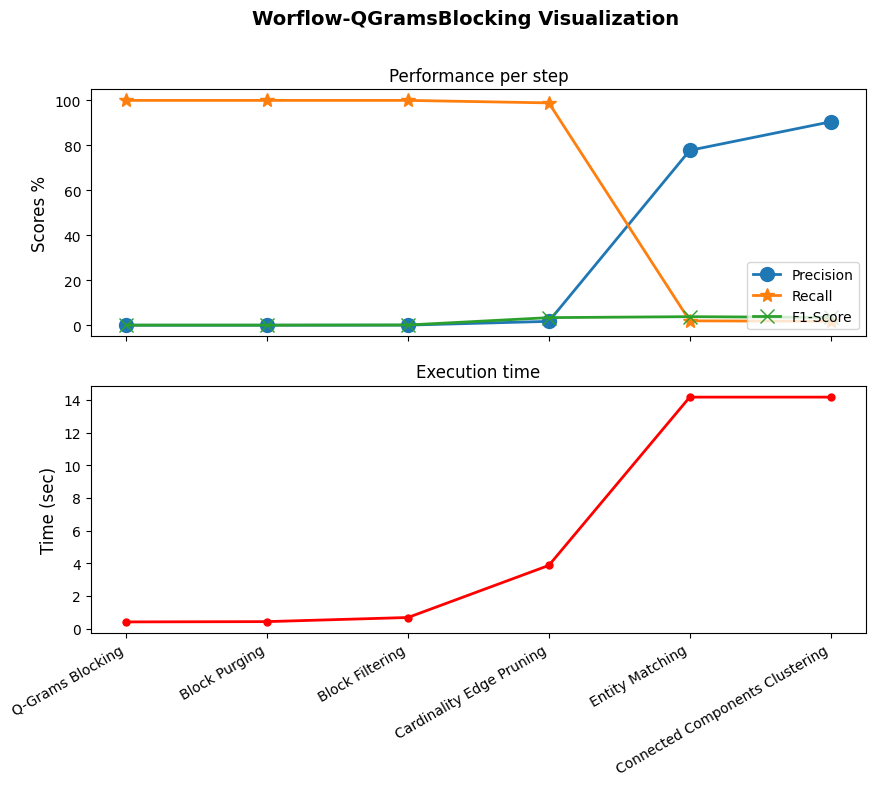
w.to_df()
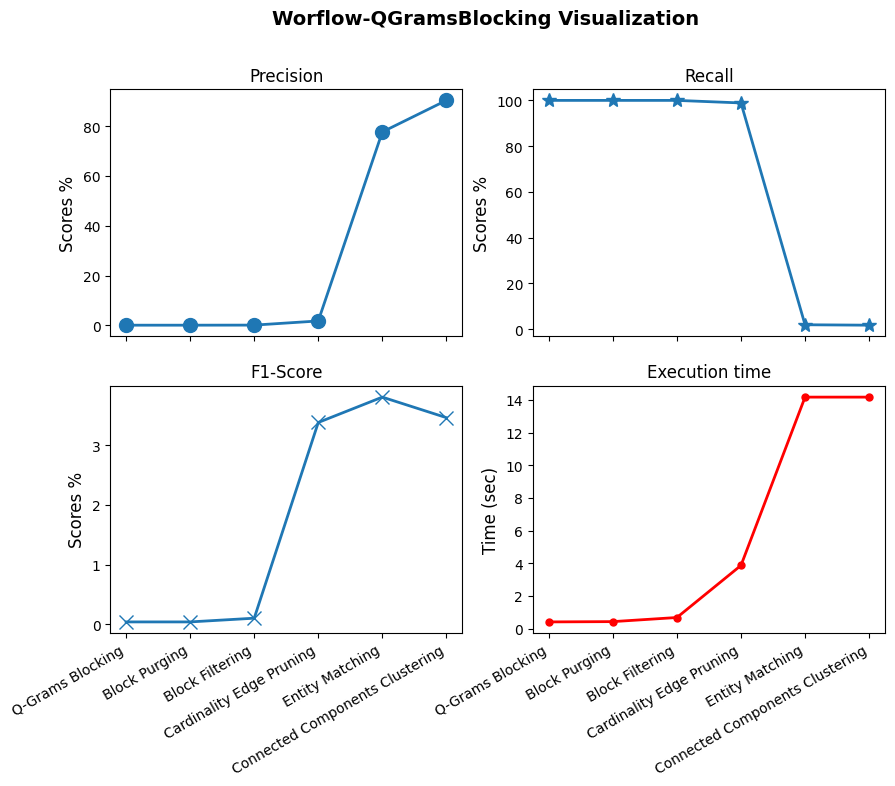
| Algorithm | F1 | Recall | Precision | Runtime (sec) | Params | |
|---|---|---|---|---|---|---|
| 0 | Q-Grams Blocking | 0.041583 | 100.000000 | 0.020796 | 0.418071 | {'Q-Gramms': 3} |
| 1 | Block Purging | 0.041583 | 100.000000 | 0.020796 | 0.018076 | {'Smoothing factor': 1.025, 'Max Comparisons p... |
| 2 | Block Filtering | 0.103805 | 100.000000 | 0.051929 | 0.251832 | {'Ratio': 0.8} |
| 3 | Cardinality Edge Pruning | 3.383094 | 98.884758 | 1.720987 | 3.186444 | {'Node centric': False, 'Weighting scheme': 'JS'} |
| 4 | Entity Matching | 3.807797 | 1.951673 | 77.777778 | 10.293099 | {'Metric': 'dice', 'Attributes': None, 'Simila... |
| 5 | Connected Components Clustering | 3.463993 | 1.765799 | 90.476190 | 0.000139 | {'Similarity Threshold': None} |
Visualization#
w.visualize()
w.visualize(separate=True)
Multiple workflows#
pyJedAI provides methods for comparing multiple workflows. For example, we can test the above example with all the Block Building methods provided.
block_building_methods = [StandardBlocking, QGramsBlocking, ExtendedQGramsBlocking, SuffixArraysBlocking, ExtendedSuffixArraysBlocking]
workflows = []
for bbm in block_building_methods:
    workflows.append(BlockingBasedWorkFlow(
        block_building = dict(
            method=bbm,
        ),
        block_cleaning = [
            dict(
                method=BlockFiltering,
                params=dict(ratio=0.8)
            ),
            dict(
                method=BlockPurging,
                params=dict(smoothing_factor=1.025)
            )
        ],
        comparison_cleaning = dict(method=CardinalityEdgePruning),
        entity_matching = dict(
            method=EntityMatching,
            metric='sorensen_dice',
            similarity_threshold=0.5,
            attributes = ['description', 'name']
        ),
        clustering = dict(method=ConnectedComponentsClustering),
        name="Workflow-"+str(bbm.__name__)
    ))
    workflows[-1].run(data, workflow_tqdm_enable=True)
Workflow-ExtendedSuffixArraysBlocking: 6it [1:14:06, 741.12s/it]
Workflow-SuffixArraysBlocking: 6it [1:14:10, 741.67s/it]
Workflow-ExtendedQGramsBlocking: 6it [1:14:17, 742.85s/it]
Workflow-QGramsBlocking: 6it [1:14:23, 743.89s/it]
Workflow-StandardBlocking: 6it [1:14:27, 744.58s/it]
compare_workflows(workflows, with_visualization=True)
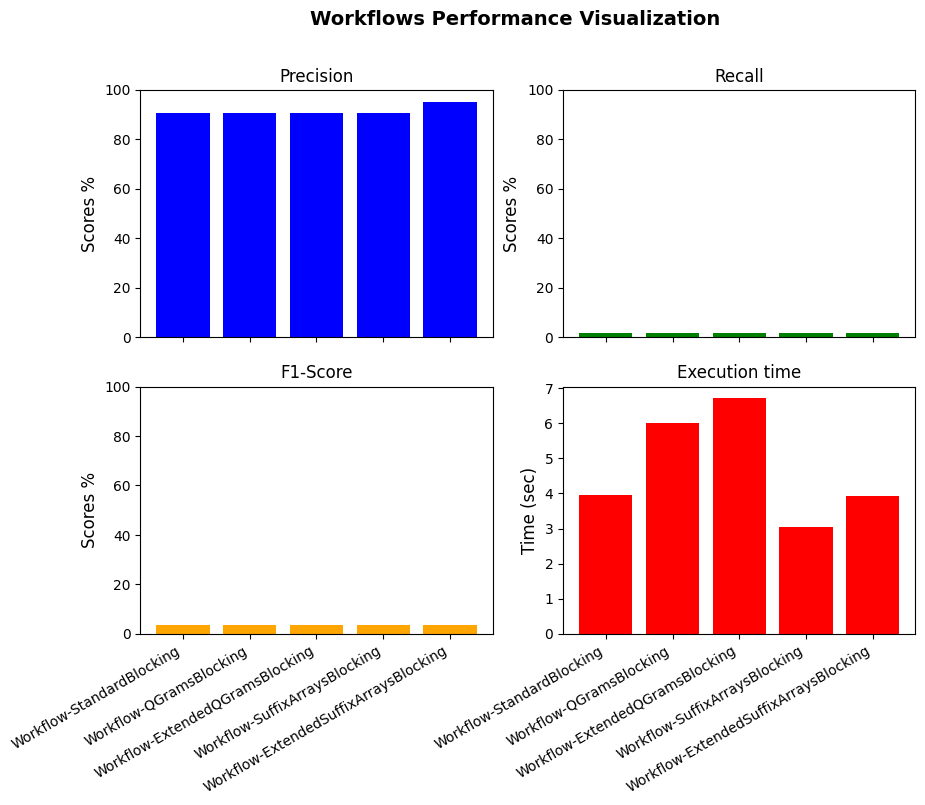
| Name | F1 | Recall | Precision | Runtime (sec) | |
|---|---|---|---|---|---|
| 0 | Workflow-StandardBlocking | 3.463993 | 1.765799 | 90.47619 | 3.953963 |
| 1 | Workflow-QGramsBlocking | 3.463993 | 1.765799 | 90.47619 | 5.999020 |
| 2 | Workflow-ExtendedQGramsBlocking | 3.463993 | 1.765799 | 90.47619 | 6.709980 |
| 3 | Workflow-SuffixArraysBlocking | 3.463993 | 1.765799 | 90.47619 | 3.039092 |
| 4 | Workflow-ExtendedSuffixArraysBlocking | 3.467153 | 1.765799 | 95.00000 | 3.937120 |